May 13, 2026. Valve just shipped the biggest Steam Community Market update since the marketplace launched in 2012. Wider UI, 27 million unique item images, list-and-play functionality, sticker and charm sub-pages, grouped wear-variants under tabs, dynamic filters, breadcrumb navigation, performance graphs with volume data. For Counter-Strike 2 traders, this isn't a refresh — it's a reset.
This guide walks through every single new feature, how to use it, and what it changes for the way you trade CS2 skins in 2026.
The Big Picture: What Changed and Why
Before this update, the Steam Community Market for CS2 was functionally a 2014-era catalog: thumbnails, prices, basic filters. To check an item's actual wear, pattern, or sticker positions, you had to launch CS2 and inspect — which means trades got abandoned half the time because the friction was real.
Valve's redesign closes that friction loop. The marketplace now shows every meaningful detail of an item directly on the listing. For trading, this is enormous: faster decisions, fewer wasted clicks, more accurate comps.
The official Valve announcement (May 13, 2026) lists eight major changes. Below is each one explained with how to actually use it.
Feature 1: List-and-Play (The Killer Feature)
This is the headline change. Previously, when you listed a CS2 skin on the Steam Market, it was instantly removed from your inventory. You couldn't equip it, you couldn't inspect it, and you couldn't show it off in-game until the listing either sold or you canceled it.
As of the update: listed items stay in your inventory and remain equippable. You can run your $2,000 Karambit Doppler in matchmaking while it's simultaneously listed for sale. When someone buys it, the listing closes and the item leaves your inventory instantly.
How to Use It
- Open your CS2 inventory on Steam.
- Right-click any item → "Sell on Community Market."
- Set your price and confirm.
- Equip the same item in your CS2 loadout. It works as normal until the listing sells.
Why This Matters for Traders
Inventory liquidity just doubled. Whales who were sitting on $50,000+ worth of skins because they didn't want to lose access while listings sat for weeks can now simultaneously use and sell. High-tier float-collectors can list their best-floats at premium prices and still get to play with them while waiting for a buyer.
Feature 2: 27 Million Unique Item Images
Valve pre-generated 27 million unique images covering every CS2 item currently listed, rendered at the item's actual float and pattern with applied stickers and charms.
The practical effect: no more "launch CS2 to inspect." You can see the exact float texture, sticker positions, and charm placements directly on the listing page. For pattern-sensitive items (Case Hardened blue gems, Crimson Web spider counts, Marble Fade rare phases), this is a complete game-changer.
How to Spot a Real Pattern Without Game Inspection
- Open any CS2 listing on the Market.
- The hero image now reflects the actual item — not a generic preview.
- Click "Inspect" to view a higher-resolution render with rotation.
- Cross-reference pattern numbers using community databases (CSFloat, CSGOStash) for pattern-specific valuations.
Feature 3: Full Item Details on Every Listing
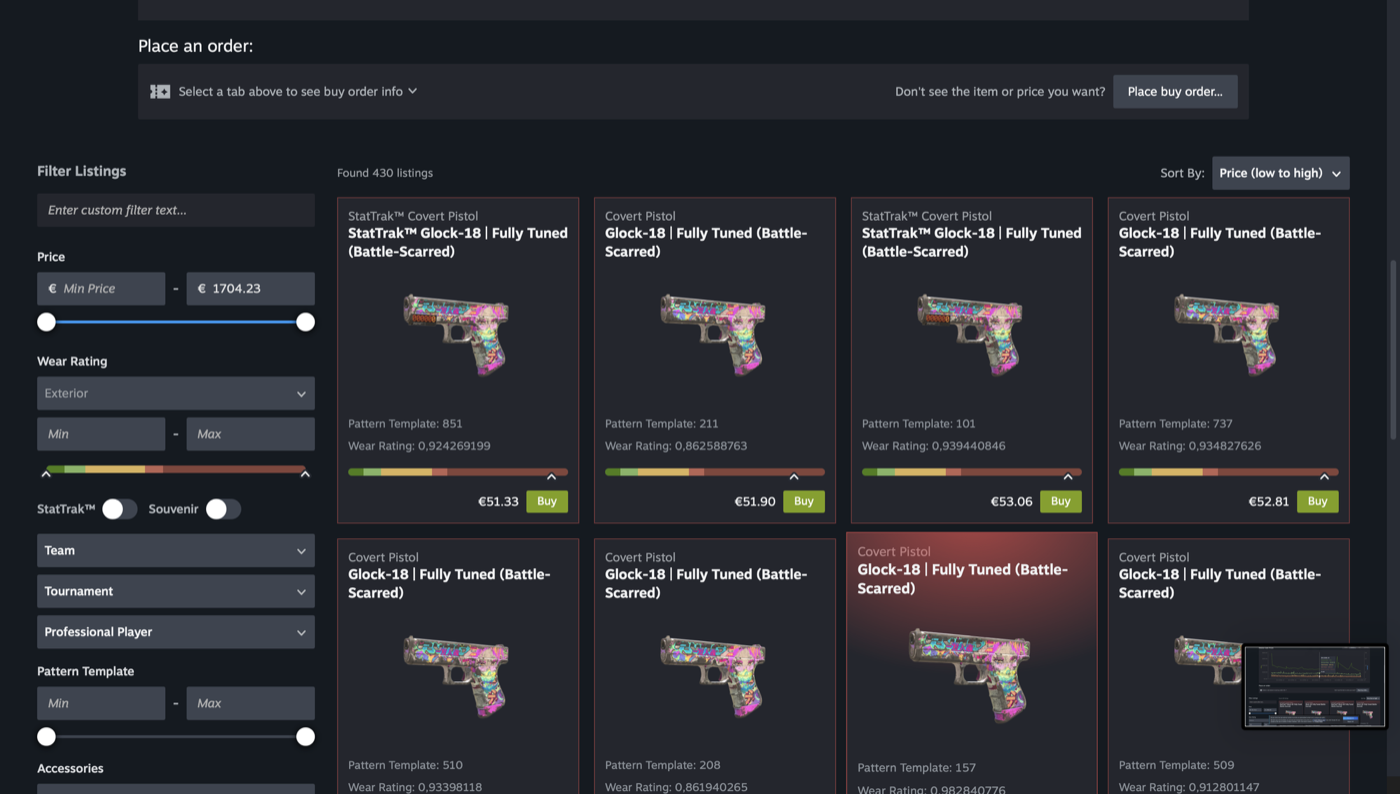
Each listing now shows:
- Float value — the exact wear number (e.g., 0.0734)
- Pattern template — the pattern index (1–1000)
- Applied stickers — name, position, and scrape percentage
- Applied charms — type and link to the charm's own market page
- StatTrak counter and Souvenir details — kill count or tournament info
- Wear category and float range — Factory New, Minimal Wear, etc. with the exact float ceiling
This is the kind of detail third-party sites like Skinport and BUFF163 have shown for years. Now Steam shows it natively, on every single listing.
Feature 4: Sticker and Charm Sub-Pages
Click any sticker or charm displayed on an item, and you jump directly to that sticker's own market page. Current price, historical chart, volume, and full sales history are all there.
Why This Matters
Sticker craft trading was previously a niche skill — you needed external tools to value an applied sticker versus an unapplied one. Now the math is right on the page. For Katowice 2014 stickers, IBP Holos, and other high-value applied stickers, the new sub-pages remove almost all the friction.
Combined with our CS2 Knife Contract Guide, this makes targeted high-value crafting much easier to plan.
Feature 5: Grouped Wear Variants
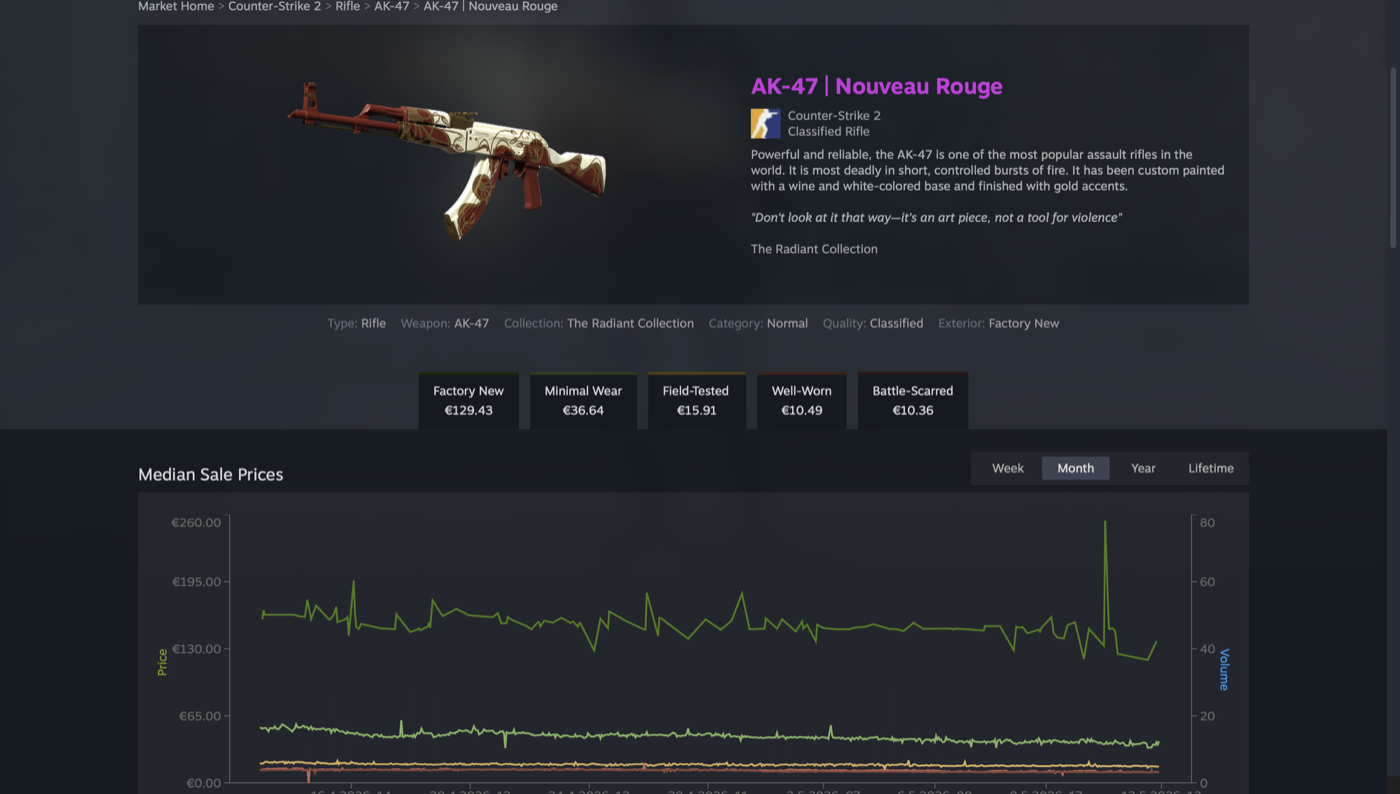
All wear conditions of the same skin (Factory New, Minimal Wear, Field-Tested, Well-Worn, Battle-Scarred) now live under one parent page with tabs. Click the skin name once, see all five wear levels with current prices and volume side-by-side.
Practical Use
For trade-up contract planning, this is a major time-saver. Comparing Float ranges across wear conditions used to require five tabs and a calculator. Now it's one page with everything visible. Combined with the best CS2 trading sites for actual execution, you can now plan trades faster than ever.
Feature 6: Dynamic Filters and Advanced Search
The new filter sidebar dynamically adjusts based on item category. CS2 listings now have filters for:
- Float range (FN min/max, MW min/max, etc.)
- Pattern index range
- Sticker application (has stickers / clean)
- Charm application
- StatTrak / Souvenir / regular
- Price range
- Recently listed
Advanced search is now accessible from more page headers, not just the homepage. You can jump to a specific float range or pattern from any browsing context.
Feature 7: Performance Graphs with Volume Data
The old price chart was a smooth average line. The new version shows:
- Price line with sale-event markers
- Volume bars showing daily transaction count
- Median price overlay
- 30-day, 90-day, all-time toggles
This is the single biggest upgrade for skin investors. Knowing volume tells you whether a price drop is a real market shift or a single panic-seller. For traders watching the recent CS2 Trade Protection changes and other Valve decisions, volume data is essential.
Feature 8: Breadcrumb Navigation and Infinite Scroll
Small but quality-of-life: breadcrumbs at the top of every page show you exactly where you are in the marketplace hierarchy. The infinite-scroll listing pages auto-load more items as you scroll, replacing the old pagination clickfest.
What This Means for CS2 Skin Trading in 2026
Three concrete shifts you'll see over the next 3–6 months:
1. Steam Market Liquidity Will Spike
The list-and-play feature removes the biggest psychological barrier to listing high-value items. Inventories worth $10k+ that were previously held entirely off-market will now flow back through Steam. Expect more depth on every order book.
2. Third-Party Marketplaces Lose Their UI Moat
Skinport, BUFF163, CS.MONEY, and similar third-party platforms built their reputation partly on better-than-Steam interfaces. That moat just got filled in. They'll have to compete harder on price, payment options, or features Steam doesn't copy.
3. Float and Pattern Premiums Solidify
With float and pattern data shown on every listing, the market becomes more efficient. Premium-float and premium-pattern items will trade at clearer multiples. Casual sellers who undervalue special patterns will dry up as buyers can now instantly see what they have.
Steam Market vs Third-Party Marketplaces — Updated Comparison
| Factor | Steam Market (after update) | Skinport / BUFF163 / CS.MONEY |
|---|---|---|
| UI quality | Now competitive | Used to lead, now tied |
| Float / pattern visibility | Native on every listing | Native on every listing |
| Transaction fee | 13% (high) | 5–8% (lower) |
| Withdrawal to cash/crypto | Steam Wallet only (locked) | Real cash / crypto / cards |
| List-and-play | YES (exclusive) | No — item leaves inventory |
| Verified seller bots | No P2P risk | Bot trading required |
| KYC requirements | Steam account in good standing | Often required for high values |
Verdict: Steam Market for short-term selling and inventory liquidity. Third-party marketplaces for converting to cash, lower fees on high-value items, and crypto cash-outs. See our complete CS2 trading sites comparison for the full breakdown.
Trading Strategies That Now Work Better
Flip with Inventory Use
List your prized skin 5–10% above current market average. Keep using it in-game while it sits. If it sells, great — you took the premium. If not, you didn't lose access to your favorite skin. Pure upside.
Float-Premium Pricing
Float visibility means buyers can no longer pretend they didn't see your low-float listing. Premium float listings (0.001–0.05 for FN, 0.07–0.10 for MW) can now command real premiums on Steam, not just on third-party float-aware sites.
Sticker Craft Arbitrage
The new sticker sub-pages make it trivial to value applied stickers. If you spot an underpriced skin with a high-value sticker craft (e.g., 4× Katowice 2014 IBP Holo), you can verify the sticker value in two clicks and snipe the listing.
Volume-Watching for Trade Timing
Volume bars expose when a market is thin. List high-value skins during volume-heavy periods (sale events, major tournaments) to maximize sale speed. For more on optimal trade timing, see our no-KYC crypto guide for cashing out fast.
What Steam Still Doesn't Do
The redesign is a UI/UX revolution but not a functionality revolution. Steam still doesn't offer:
- Direct crypto deposits or withdrawals
- Real cash payouts (Steam Wallet only)
- P2P bot trades for fee bypass
- Case battles, coinflips, or RNG games
- Trade-up automation
- Bonus codes or loyalty programs
For any of those features, you'll still go to third-party platforms. Our mystery boxes page and trading sites comparison cover the alternatives in detail.
FAQ
When did the Steam Market redesign launch?
May 13, 2026. The update was deployed globally and applied to all 13,000+ tradable-item games on Steam, with CS2 receiving the most immediate visual upgrades.
Does "list-and-play" work for all CS2 items?
Yes — all CS2 tradable items support list-and-play, including knives, gloves, weapon skins, stickers, and charms. The only exception is items currently in active trade hold from a recent trade-up or transaction.
Will third-party marketplaces still be cheaper than Steam?
For most items, yes — Skinport and BUFF163 typically run 5–8% fees vs Steam's 13%. For low-value items, the difference is small; for high-value items ($500+), third-party marketplaces save real money.
Can I still cash out to real money via Steam?
No. Steam Wallet funds remain locked to the Steam ecosystem. For real-cash or crypto payouts, you'll still need a third-party marketplace or cash-out service. See our no-KYC crypto guide.
Does the new design affect sticker craft prices?
Yes — applied sticker values are now transparent on every listing. Expect sticker-craft prices to tighten across the market as casual sellers stop undervaluing their crafts.
Will my old Steam Market history still be there?
Yes — all your historical purchases, sales, and listings are preserved. The redesign is purely presentation; account data is untouched.
Is this the same as the Trade-Up Contract update?
No — those are two separate updates. The Trade-Up Contract change (allowing 5 Covert → 1 Knife) happened earlier in May 2026 and caused a $2 billion market correction. The Steam Market redesign on May 13 is a UI/UX overhaul, not a trade-up mechanics change.
Bottom Line
The May 13, 2026 Steam Community Market redesign is the biggest functional upgrade Valve has shipped for the marketplace in over a decade. List-and-play alone justifies a fresh look at how you manage your CS2 inventory. Combined with 27 million unique item images, sticker sub-pages, grouped wear tabs, and volume graphs, Steam finally feels like a 2026-era marketplace.
For traders: use list-and-play to monetize idle inventory. Use volume graphs to time exits. Use grouped wear-variants for faster comparison. For deeper cash-out flexibility, stick with third-party marketplaces. For gambling and RNG games, see our mystery boxes hub.
The CS2 trading meta just shifted. The traders who adapt fastest will capture the most upside.